Founder-built
Built because the gap is real
Windows does not expose Google Nest speakers as normal playback devices. PC Nest Speaker exists to create that missing route for everyday desktop audio.
Windows audioGoogle Cast speakers
Stream full Windows audio to one speaker, a left/right speaker pair, or a speaker group over your local Wi-Fi.
Install. Pick your speakers. Press play.
Try it free on your own Wi-Fi before you buy.
Typical delay is around 200–300ms depending on Wi-Fi and speaker setup. Good for music, video, calls, and casual gaming.
How It Works
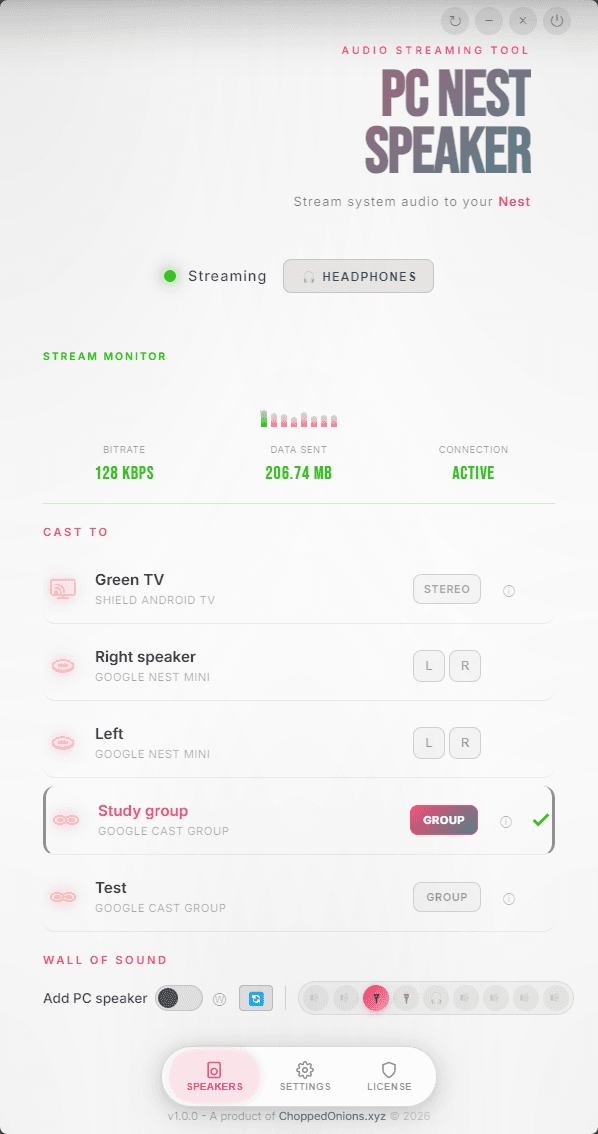
This is the real Windows app. Watch it discover speakers, pick a setup, and start playing before you install anything.
Actual Windows app
Discovery to playback in one real flow
Three-step flow
Install the Windows app and open it. The trial is full-featured and does not require an account or card.
The app finds supported speakers on your Wi-Fi. Pick a single speaker, stereo pair, or group.
Your Windows audio streams to the speaker, pair, or group you chose. Sync tools help keep PC and Nest playback aligned.
Trial first
Test this on your own speakers and Wi-Fi before you buy.
Pricing
The trial gives you 1 hour to test discovery, delay, stereo, groups, and everyday playback on your own Wi-Fi. If it works well, it's $15 once, with a 30-day money-back guarantee.
Use the trial to verify
Supported speaker discovery on your Wi-Fi
Delay and overall fit on your setup
Stereo pairs, groups, and saved setups
Everyday playback from the apps you already use
Compatibility
PC Nest Speaker works with Google Nest speakers, Google Home speakers, Chromecast Audio, and other Google Cast devices on the same Wi-Fi network as your PC. The free trial is the fastest way to confirm fit before you keep it.
Updates and support
Need help with setup, purchases, or licence recovery? Email the PC Nest Speaker support mailbox directly.
kepners@pcnestspeaker.appDownload the full-feature trial first. Buy once only after it works well on your setup.
The trial is full-featured and needs no account or card.
Verify discovery, delay, stereo, groups, and everyday fit on your Wi-Fi.
Keep it only after it works well on your speakers and network.
Product Proof
No inflated review counts. No fake social proof. The claim is simple: install the app, test your own speakers, and keep it only if it works for your setup.
Founder-built
Windows does not expose Google Nest speakers as normal playback devices. PC Nest Speaker exists to create that missing route for everyday desktop audio.
Pick one speaker, assign left and right speakers for stereo, or use a saved group when you want the same PC audio in more than one place.
The trial gives you 1 hour to check discovery, delay, speaker pairs, groups, and everyday playback before paying anything.
Features
The stream gets you started. These features keep it useful.
Save the speakers you use most, including single speakers, stereo pairs, groups, and Wall of Sound mode, so getting back to a working setup takes less effort.
Send the same Windows audio to supported speaker groups around the house over local Wi-Fi.
Send left and right channels to supported speaker pairs for stereo playback from your PC.
Keep your PC speakers playing too. Sync can delay your PC speakers to help keep playback aligned with Nest playback.
See connection and playback status while you stream.
Find compatible Nest, Home, Chromecast, and other supported Cast devices on your network automatically.
Launch with Windows and reconnect to saved speakers more easily.
FAQ
Common questions about compatibility, supported devices, delay, local-only streaming, and whether the app fits your setup.
Question
Yes. PC Nest Speaker captures Windows audio at the PC level and streams music, video, desktop apps, calls, games, Spotify, and system sound to compatible Nest speakers over local Wi-Fi.
See how it worksQuestion
Because Nest speakers use Google Cast rather than appearing as standard Windows playback devices. Windows does not include a native full-system Cast output, so Google's built-in tools stay focused on tabs, supported media, and app-specific workflows.
Read more about the limitationsQuestion
Install PC Nest Speaker on Windows, let it discover compatible speakers on the same Wi-Fi, and choose a speaker or saved setup. After that, the audio Windows is already playing can follow to your Nest speakers.
3-step setup guideQuestion
Bluetooth can work for quick testing, but it is limited for everyday PC audio. It becomes less practical once you want stereo, groups, easier reconnects, or better day-to-day convenience. Local Wi-Fi streaming is usually the better fit for regular use.
Compare all optionsQuestion
Chrome casting sends one browser tab or supported web media. System audio streaming follows what Windows is playing across desktop apps, browsers, games, calls, and notifications.
Full comparisonQuestion
Usually because Windows does not provide a native Cast output for full desktop audio. If you can only see browser casting options or a Bluetooth pairing flow, you are running into that platform limitation.
See the solutionQuestion
Nest speakers are not immediate on any setup because Google Cast buffers audio. Typical delay is around 200–300ms depending on your Wi-Fi and speaker setup. Works well for music, video, calls, and casual gaming. For competitive gaming, use wired or direct speakers. Sync can delay your PC speakers to help keep playback aligned with Nest playback.
See sync featureQuestion
Yes. PC Nest Speaker lets you assign left and right audio channels to supported speaker pairs for stereo playback from your PC. That is different from simply placing speakers in a group.
See stereo featureQuestion
Yes. PC Nest Speaker routes all Windows audio, not just browser audio, so the Spotify desktop app, Apple Music for Windows (which has no Cast button of its own), YouTube Music, Tidal, Amazon Music, and local players all play through your Nest speakers with the same setup.
Question
PC Nest Speaker is built for Google Nest speakers (including Nest Audio, Nest Mini, Nest Hub, and Nest Hub Max), Google Home speakers, Chromecast devices, Chromecast Audio, and Nvidia Shield. Compatibility depends on Google Cast support and your network setup, so the trial is the best way to verify fit.
Question
Yes, if your TV supports Google Cast. Android TV and Google TV models commonly work natively, including many Sony Bravia, TCL, Hisense, and Philips sets. Samsung (Tizen OS) and LG (webOS) TVs generally do not include Google Cast, so you would usually need a Chromecast, Chromecast with Google TV, or Nvidia Shield connected to the TV.
See supported devicesQuestion
Yes. PC Nest Speaker remembers your speaker configuration and can reconnect when you start the app. If you enable 'Start with Windows' in settings, it can reopen with your saved stereo setup, speaker groups, Wall of Sound mode, and volume settings.
See Auto-Start featureQuestion
No. PC Nest Speaker runs locally on your computer, and audio streams directly from your PC to your Nest speakers over your local Wi-Fi network. We do not relay audio through cloud servers, and no account is required.
Question
Yes. PC Nest Speaker includes a 1-hour full-feature trial. Test speaker discovery, latency, stereo, groups, supported-device fit, and everyday playback on your own setup. If it works well, buy once for $15. No account required, and purchases include a 30-day money-back guarantee.
Start free trialWhy This Needs an App
Nest speakers use Google Cast, not a normal Windows playback output. PC Nest Speaker fills that gap by handling the handoff between Windows audio and compatible Google speakers so the route exists at all.
Core limitation
That is the whole platform gap in one sentence. Windows can route audio to standard outputs, while Nest speakers wait for a Cast-aware handoff that Windows does not provide by default.
Windows audio
Normal desktop playback
Missing piece
No native full-system Cast route
What bridges it
PC Nest Speaker on your Wi-Fi
It discovers compatible devices on your Wi-Fi and creates the route Windows does not provide on its own, so playback feels more like a repeatable speaker setup than a one-off workaround.
Discovers compatible Nest, Home, and Chromecast devices already on your network.
Sends the Windows audio already playing across music, video, calls, games, and system sound.
Keeps the setup focused on everyday Windows audio instead of browser-only workarounds.
Comparison
Mirroring tools and browser casting can help for one-off sessions. PC Nest Speaker is built for everyday Windows audio on Nest speakers. Read the full comparison guide.
PC Nest Speaker
Best fit
Every app and system sound
AirParrot & similar
Can help
Can work, but not audio-first
Browser casting / mirroring
Limited
Usually stops at one tab or session
PC Nest Speaker
Best fit
Purpose-built for Cast audio devices
AirParrot & similar
Can help
General casting tool
Browser casting / mirroring
Limited
Usually not Nest-specific
PC Nest Speaker
Best fit
Saved pairs and group playback
AirParrot & similar
Limited
Not centered on Nest audio
Browser casting / mirroring
Limited
Often awkward or missing
PC Nest Speaker
Best fit
Made for repeat daily use
AirParrot & similar
Can help
More manual
Browser casting / mirroring
Limited
Usually ad hoc
PC Nest Speaker
Best fit
Tools built into the app
AirParrot & similar
Can help
Varies by workflow
Browser casting / mirroring
Limited
Usually absent
PC Nest Speaker
Best fit
Typical 200–300ms depending on setup
AirParrot & similar
Can help
Mirroring adds overhead
Browser casting / mirroring
Can help
Less predictable in practice
PC Nest Speaker
Best fit
Audio stays on your network
AirParrot & similar
Best fit
Local streaming
Browser casting / mirroring
Can help
Depends on the product
PC Nest Speaker
Best fit
$15 one-time license
AirParrot & similar
Can help
Paid software
Browser casting / mirroring
Can help
Varies a lot
Decision frame
If you want one reliable route from Windows to Nest, this is the audio-first option.
Setup Guides
Use the page that matches your device, delay issue, or setup goal without wading through unrelated answers.
Ready When You Are
Download the trial and test it on your own setup — discovery, delay, stereo, groups, everyday playback. Buy once only if it works.